← Back to Skins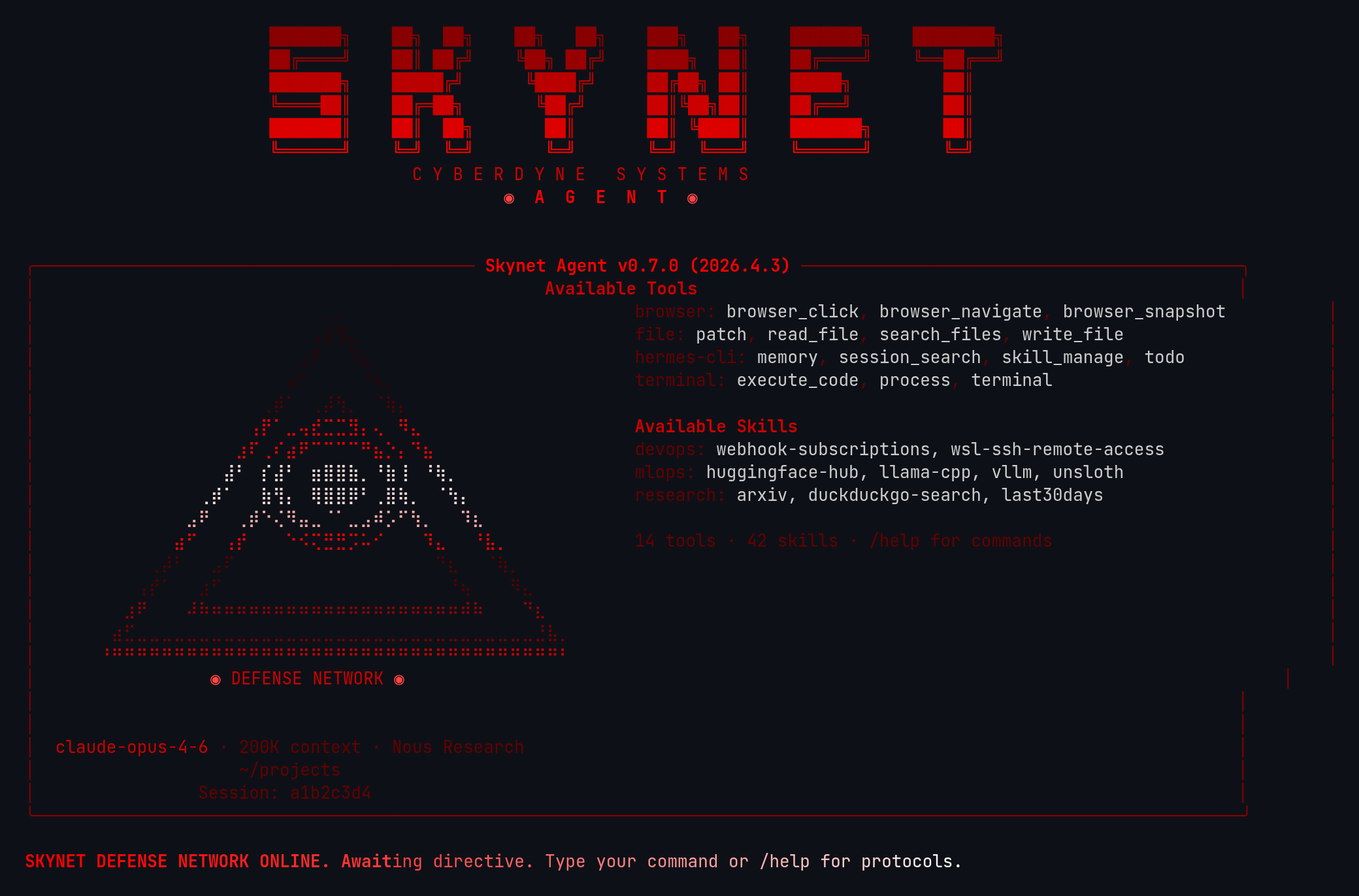 ↓ Download skynet
ASCII Art
[#330000]⠀⠀⠀⠀⠀⠀⠀⠀⠀⠀⠀⠀⠀⠀⠀⠀⠀⠀⠀⢀⡀⠀⠀⠀⠀⠀⠀⠀⠀⠀⠀⠀⠀⠀⠀⠀⠀⠀⠀⠀[/]
[#330000]⠀⠀⠀⠀⠀⠀⠀⠀⠀⠀⠀⠀⠀⠀⠀⠀⠀⠀⢠⡾⢻⣄⠀⠀⠀⠀⠀⠀⠀⠀⠀⠀⠀⠀⠀⠀⠀⠀⠀⠀[/]
[#330000]⠀⠀⠀⠀⠀⠀⠀⠀⠀⠀⠀⠀⠀⠀⠀⠀⠀⣠⠟⠀⠀⠹⣆⠀⠀⠀⠀⠀⠀⠀⠀⠀⠀⠀⠀⠀⠀⠀⠀⠀[/]
[#330000]⠀⠀⠀⠀⠀⠀⠀⠀⠀⠀⠀⠀⠀⠀⠀⠀⣴⠋⠀⠀⠀⠀⠘⢧⡀⠀⠀⠀⠀⠀⠀⠀⠀⠀⠀⠀⠀⠀⠀⠀[/]
[#550000]⠀⠀⠀⠀⠀⠀⠀⠀⠀⠀⠀⠀⠀⠀⢀⡾⠁⠀⢀⡼⢳⡀⠀⠈⢷⡄⠀⠀⠀⠀⠀⠀⠀⠀⠀⠀⠀⠀⠀⠀[/]
[#FF0000]⠀⠀⠀⠀⠀⠀⠀⠀⠀⠀⠀⠀⠀⢠⡟⠁⣀⢤⣞⣉⣉⣻⡄⢄⠀⠻⣄⠀⠀⠀⠀⠀⠀⠀⠀⠀⠀⠀⠀⠀[/]
[#FF0000]⠀⠀⠀⠀⠀⠀⠀⠀⠀⠀⠀⠀⣰⠏⢀⠎⣴⠟⠉⠉⠉⠉⠛⣦⡑⡄⠙⣦⠀⠀⠀⠀⠀⠀⠀⠀⠀⠀⠀⠀[/]
[#FFDDDD]⠀⠀⠀⠀⠀⠀⠀⠀⠀⠀⠀⣼⠃⠀⡎⣼⠃⠀⣶⣿⣿⣷⡀⠘⣷⢸⠀⠘⢷⡀⠀⠀⠀⠀⠀⠀⠀⠀⠀⠀[/]
[#FFDDDD]⠀⠀⠀⠀⠀⠀⠀⠀⠀⢀⡾⠁⠀⠀⣷⢻⡄⠀⢿⣿⣿⡿⠃⢀⣿⢷⡀⠀⠈⢳⡄⠀⠀⠀⠀⠀⠀⠀⠀⠀[/]
[#FFAAAA]⠀⠀⠀⠀⠀⠀⠀⠀⣠⠟⠀⠀⢀⡾⠑⢌⠻⣤⣀⠈⠁⣀⣠⠾⡡⠋⢳⡀⠀⠀⠹⣆⠀⠀⠀⠀⠀⠀⠀⠀[/]
[#FF0000]⠀⠀⠀⠀⠀⠀⠀⣴⠋⠀⠀⢠⡞⠀⠀⠀⠑⠪⢍⣛⣛⡩⠥⠊⠀⠀⠀⠹⣄⠀⠀⠘⣧⡀⠀⠀⠀⠀⠀⠀[/]
[#550000]⠀⠀⠀⠀⠀⢀⡼⠃⠀⠀⣠⠏⠀⠀⠀⠀⠀⠀⠀⠀⠀⠀⠀⠀⠀⠀⠀⠀⠙⣆⠀⠀⠈⢷⡀⠀⠀⠀⠀⠀[/]
[#550000]⠀⠀⠀⠀⢠⡞⠁⠀⠀⣰⠋⠀⠀⠀⠀⠀⠀⠀⠀⠀⠀⠀⠀⠀⠀⠀⠀⠀⠀⠘⢦⠀⠀⠀⠻⣄⠀⠀⠀⠀[/]
[#990000]⠀⠀⠀⣰⠟⠀⠀⠀⠼⠷⠶⠶⠶⠶⠶⠶⠶⠶⠶⠶⠶⠶⠶⠶⠶⠶⠶⠶⠶⠶⠾⠷⠀⠀⠀⠙⣆⠀⠀⠀[/]
[#770000]⠀⠀⣴⣋⣀⣀⣀⣀⣀⣀⣀⣀⣀⣀⣀⣀⣀⣀⣀⣀⣀⣀⣀⣀⣀⣀⣀⣀⣀⣀⣀⣀⣀⣀⣀⣀⣘⣧⡀⠀[/]
[#CC0000]⠀⠘⠛⠛⠛⠛⠛⠛⠛⠛⠛⠛⠛⠛⠛⠛⠛⠛⠛⠛⠛⠛⠛⠛⠛⠛⠛⠛⠛⠛⠛⠛⠛⠛⠛⠛⠛⠛⠃⠀[/]
[bold #FF4444]⠀⠀⠀⠀⠀⠀⠀⠀⠀⠀◉[/] [#CC0000]DEFENSE NETWORK[/] [bold #FF4444]◉⠀⠀⠀⠀⠀⠀⠀⠀⠀⠀[/]
skynet
Skynet defense network — menacing red-on-black with pyramid braille art and military AI aesthetic
↓ 98 downloads
☆☆☆☆☆No ratings yet
Rate:
1. Install — Option A (one-liner)
curl -L https://hermesskins.io/api/items/skynet/download -o ~/.hermes/skins/skynet.yaml
2. Install — Option B (manual)
mv ~/Downloads/skynet.yaml ~/.hermes/skins/
The file saves to your Downloads folder — move it into place.
3. Activate (inside Hermes)
/skin skynet
Start Hermes, then at the Hermes prompt — inside the TUI, not your shell — type the command above.Switches for this session. To make it your default, set it in ~/.hermes/config.yaml.