← Back to Skins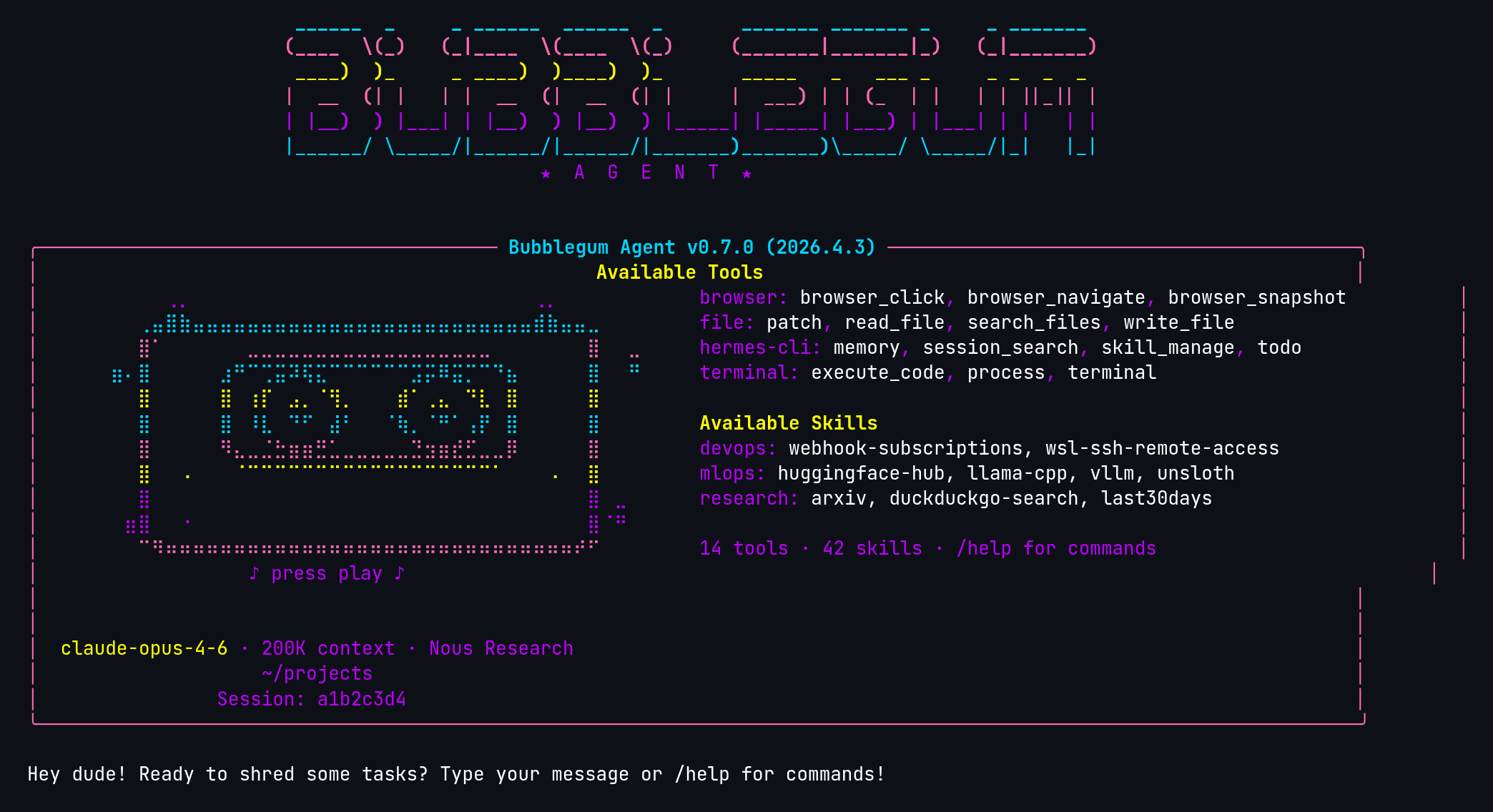 ↓ Download bubblegum-80s
ASCII Art
[#BF00FF]⠀⠀⠀⠀⠀⠀⢀⡀⠀⠀⠀⠀⠀⠀⠀⠀⠀⠀⠀⠀⠀⠀⠀⠀⠀⠀⠀⠀⠀⠀⠀⠀⠀⢀⡀⠀⠀⠀⠀⠀⠀⠀[/]
[#00D4FF]⠀⠀⠀⠀⢀⣤⣿⣷⣤⣤⣤⣤⣤⣤⣤⣤⣤⣤⣤⣤⣤⣤⣤⣤⣤⣤⣤⣤⣤⣤⣤⣤⣤⣾⣷⣤⣤⣀⠀⠀⠀⠀[/]
[#FF69B4]⠀⠀⠀⠀⣿⠁⠀⠀⠀⠀⠀⠀⣀⣀⣀⣀⣀⣀⣀⣀⣀⣀⣀⣀⣀⣀⣀⣀⣀⣀⠀⠀⠀⠀⠀⠀⠀⣿⠀⠀⣀⠀[/]
[#00D4FF]⠀⠀⣶⠄⣿⠀⠀⠀⠀⠀⣰⠛⠉⢉⣭⠽⢯⣍⠉⠉⠉⠉⠉⠉⣩⡭⠿⣭⡉⠉⠙⣦⠀⠀⠀⠀⠀⣿⠀⠀⠛⠀[/]
[#FFFF00]⠀⠀⠀⠀⣿⠀⠀⠀⠀⠀⣿⠀⢰⡏⠀⣠⡀⠈⢻⡀⠀⠀⠀⣾⠁⢀⣄⠀⠙⣇⠀⣿⠀⠀⠀⠀⠀⣿⠀⠀⠀⠀[/]
[#00D4FF]⠀⠀⠀⠀⣿⠀⠀⠀⠀⠀⣿⠀⠸⣇⠀⠙⠋⠀⣼⠃⠀⠀⠈⢷⡀⠈⠛⠁⢠⡟⠀⣿⠀⠀⠀⠀⠀⣿⠀⠀⠀⠀[/]
[#FF69B4]⠀⠀⠀⠀⣿⠀⠀⠀⠀⠀⠻⣄⣀⣈⣓⣶⣶⣛⣁⣀⣀⣀⣀⣀⣙⣲⣶⣞⣋⣀⣀⡿⠀⠀⠀⠀⠀⣿⠀⠀⠀⠀[/]
[#FFFF00]⠀⠀⠀⠀⣿⠀⠀⠠⠀⠀⠀⠈⠉⠉⠉⠉⠉⠉⠉⠉⠉⠉⠉⠉⠉⠉⠉⠉⠉⠉⠁⠀⠀⠀⠠⠀⠀⣿⠀⠀⠀⠀[/]
[#BF00FF]⠀⠀⠀⠀⣿⠀⠀⠀⠀⠀⠀⠀⠀⠀⠀⠀⠀⠀⠀⠀⠀⠀⠀⠀⠀⠀⠀⠀⠀⠀⠀⠀⠀⠀⠀⠀⠀⣿⠀⣀⠀⠀[/]
[#BF00FF]⠀⠀⠀⣶⣿⠀⠀⠐⠀⠀⠀⠀⠀⠀⠀⠀⠀⠀⠀⠀⠀⠀⠀⠀⠀⠀⠀⠀⠀⠀⠀⠀⠀⠀⠀⠀⠀⣿⠈⠛⠀⠀[/]
[#FF69B4]⠀⠀⠀⠀⠉⠻⠶⠶⠶⠶⠶⠶⠶⠶⠶⠶⠶⠶⠶⠶⠶⠶⠶⠶⠶⠶⠶⠶⠶⠶⠶⠶⠶⠶⠶⠶⠞⠋⠀⠀⠀⠀[/]
[dim #BF00FF]⠀⠀⠀⠀⠀⠀⠀⠀⠀⠀⠀⠀⠀♪ press play ♪⠀⠀⠀⠀⠀⠀⠀⠀⠀⠀⠀⠀⠀⠀⠀⠀⠀[/]
bubblegum-80s
Totally radical 1980s bubblegum-inspired theme with bright pastels and neon accents
↓ 158 downloads
☆☆☆☆☆No ratings yet
Rate:
1. Install — Option A (one-liner)
curl -L https://hermesskins.io/api/items/bubblegum-80s/download -o ~/.hermes/skins/bubblegum-80s.yaml
2. Install — Option B (manual)
mv ~/Downloads/bubblegum-80s.yaml ~/.hermes/skins/
The file saves to your Downloads folder — move it into place.
3. Activate (inside Hermes)
/skin bubblegum-80s
Start Hermes, then at the Hermes prompt — inside the TUI, not your shell — type the command above.Switches for this session. To make it your default, set it in ~/.hermes/config.yaml.